Restaurant CRM that builds itself at the till
Every bill you print and every WhatsApp chat adds a guest to your list. SpotBay sorts guests into groups on its own, sends birthday wishes and miss-you nudges for you, and keeps every conversation in one inbox, so each guest is one WhatsApp message away.
- Guest list from your bills and WhatsApp chats
- Smart Groups such as Dormant and High Value
- Birthday, anniversary and miss-you messages
- One inbox for every WhatsApp chat
- Runs in any browser
- Android POS app
- Official WhatsApp Business Platform
- GST invoices
See it in action
From a bill to a guest who comes back
Here is how a restaurant's guest list fills up and starts working for you.
Step 1 of 4
A closer look
The real screens you'll use
Captured from SpotBay with a sample business.
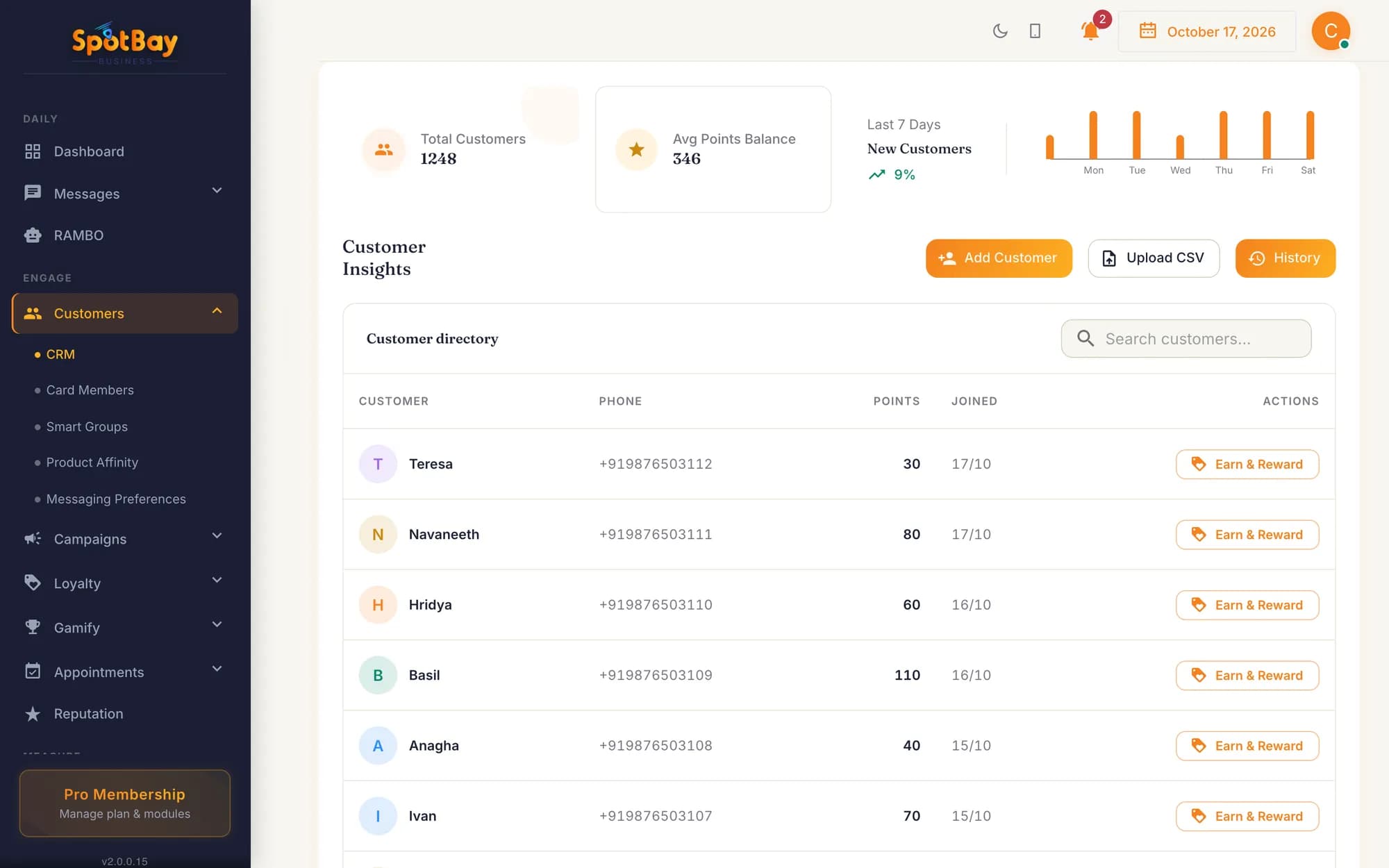
Guest list
Every guest from the bill, with their points
Guests join your list when you bill them or when they say hi on WhatsApp. Add one by hand or upload a CSV.
- Points per guest
- Add or upload guests
- Earn & Reward from the list
Reminders
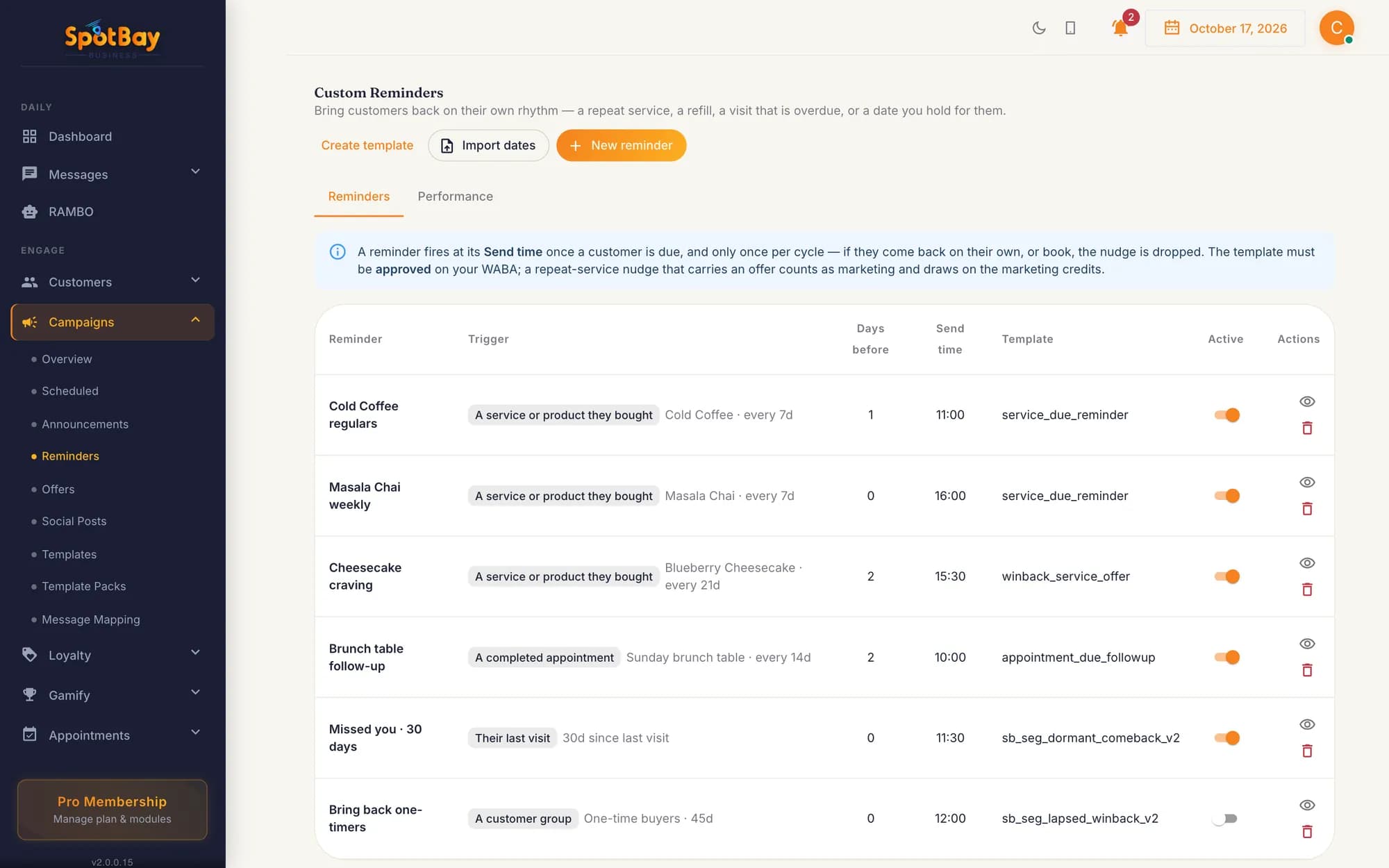
A nudge when a regular is due
Remind guests about the item they buy every week, or win back anyone who hasn't visited in 30 days. Each reminder goes out at its own send time.
- Triggered by an item, a visit or a group
- Your approved WhatsApp template
- Turn each one on or off
Campaigns
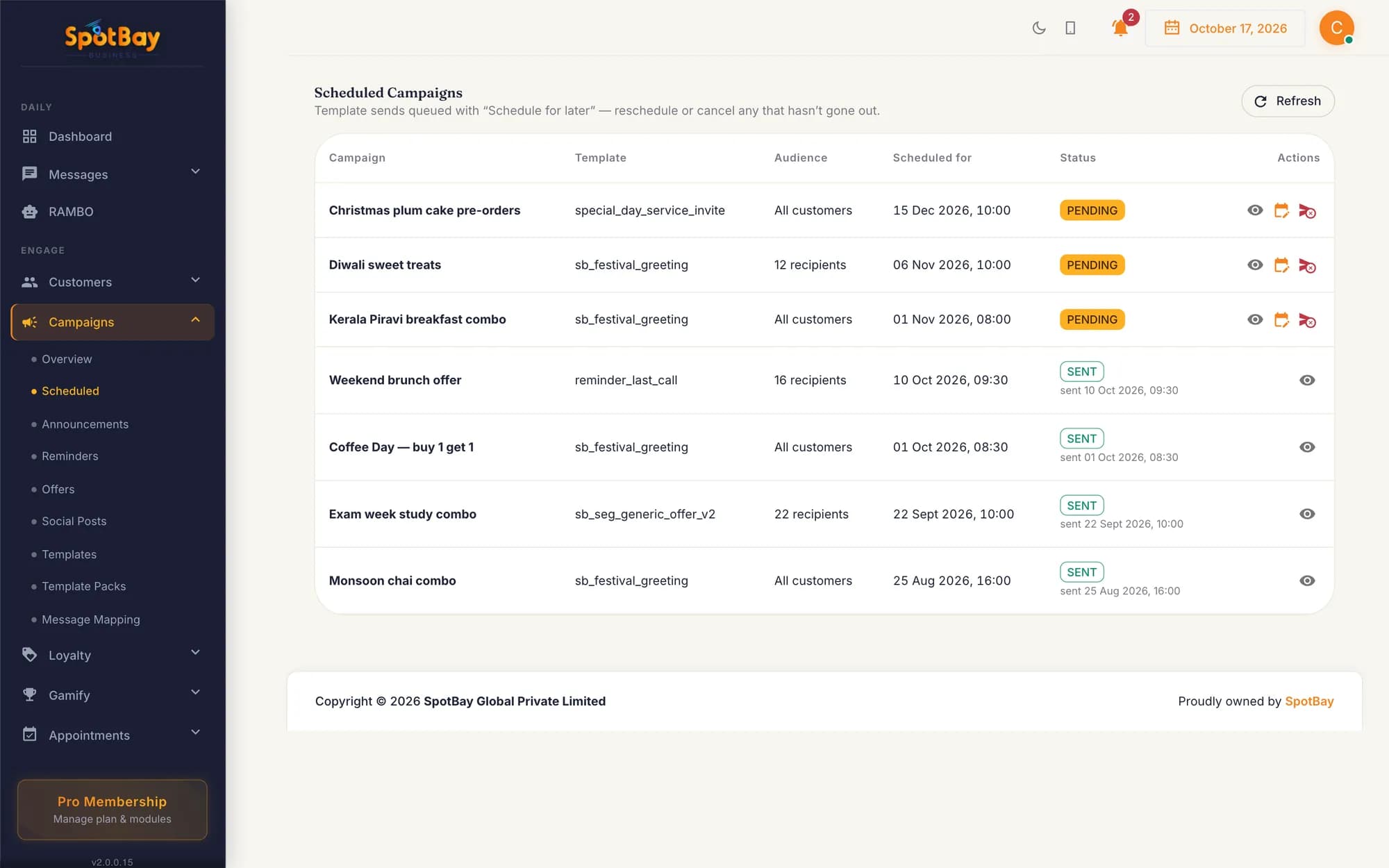
Festival offers, scheduled ahead
Schedule a campaign to all guests or a group, and see what is pending and what has gone out.
- All customers or chosen recipients
- Reschedule or cancel before it sends
- Sent time on every campaign
How food businesses use their guest list
Cafés
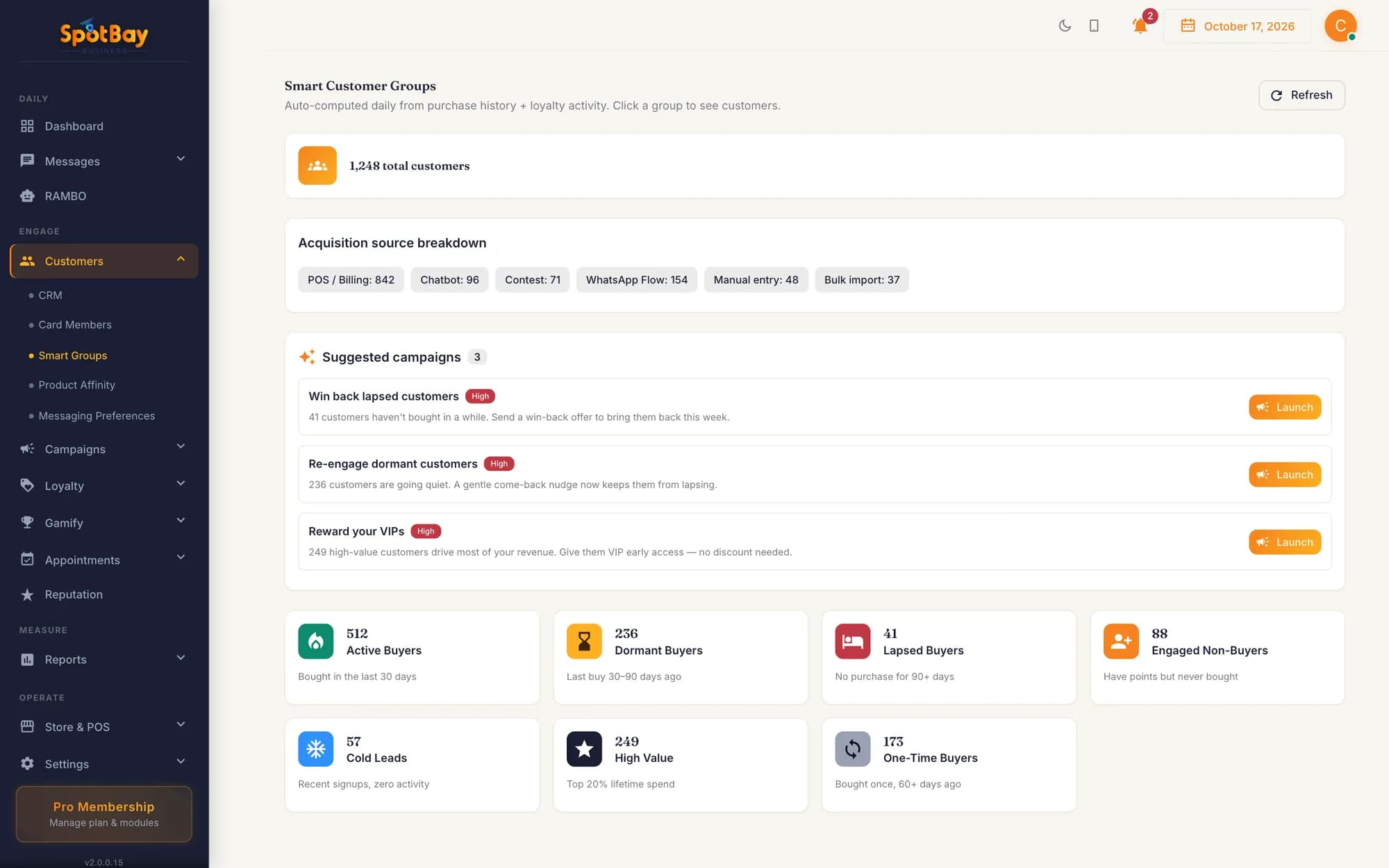
Café Aroma sends a “Thank you + Rate us” message after every bill. Guests in the Dormant Smart Group get a miss-you offer of a free cookie with their next coffee.
Quick service
A quick-service counter checks Product Affinity to find its Category Champions for wraps. When a new wrap launches, it sends them the suggested campaign first.
Fine dining
A fine-dining restaurant imports anniversary dates from a CSV, and couples get a WhatsApp wish that invites them back for dinner. A low rating after a visit alerts the owner, who calls the guest.
Bakeries
A bakery tags guests who order celebration cakes as “Cake orders” and sends them its festive menu before Diwali. Birthday wishes go out on their own.
Cloud kitchens
A cloud kitchen meets its guests on WhatsApp, not at a table. Order questions land in one inbox, and a weekend offer goes to the Lapsed Smart Group to bring back guests who ordered months ago.
Chains
A restaurant chain keeps one guest list across its outlets and checks each one with the dashboard's branch filter. Key Highlights compare today with the same day last week.
What your restaurant CRM includes
A guest list that fills itself
Guests join your CRM list when you add their mobile number to a bill on SpotBay POS, or when they message your WhatsApp number.
Tags you create
Make your own groups, such as “Corporate lunch” or “Cake orders”, and send a campaign or a broadcast to a tag.
Smart Groups
Guests sort themselves into Active Buyers, Dormant, Lapsed, High Value, One-Time Buyers and more. The groups refresh every 3 hours.
Product Affinity
See your Category Champions, Diverse Shoppers, Price-Sensitive Buyers and Premium Buyers, each with a suggested campaign.
Birthdays and anniversaries
Birthday and anniversary wishes go out on WhatsApp on their own. Points expiry reminders tell guests to come back before their points run out.
Win back quiet regulars
Miss-you nudges reach guests who have stopped coming. Your own automations can run on a visit, a product, a category or a segment, with quiet hours and cooldowns.
Feedback after every visit
Send Thank you, Thank you + Rate us, or a points update after each bill. Low ratings alert you at once, and a Google review QR makes it easy for guests to review you on Google.
One inbox for every chat
See every WhatsApp chat across your numbers in one place. Send photos, PDFs and voice notes, and take over from the bot when a guest needs a person.
Groups ready for a campaign
- Active Buyers (last 30 days), Dormant (30–90 days) and Lapsed (90+ days)
- High Value (top 20% by spend) and One-Time Buyers
- Engaged Non-Buyers and Cold Leads
- Visit groups such as Weekly Regular and Saturday/Sunday Loyal Visitors
- Spend groups: Budget, Value and Premium Spenders
Messages that go out on their own
- Birthday and anniversary wishes
- Miss-you nudges, points expiry reminders and upsell
- Automations that repeat weekly, monthly, quarterly or yearly
- Quiet hours, cooldowns and CSV import of dates
- Revenue won shown in the Performance tab
Campaigns and conversations
- Send to All Customers, a Smart Group, Suggested Customers or a Tag
- Send now or schedule for later, in IST
- Add an image, a video or a PDF
- Reports for Sent, Delivered, Read, Failed and Opted-out
- STOP opts a guest out, and START opts them back in
Works with the rest of SpotBay
Questions people ask
Do guests need to download anything?
No. Messages reach guests on WhatsApp, and rewards are applied at the counter during billing. Each guest also has a brand page that opens in the browser, with their points and a QR to show at the counter.
Where does the guest list come from?
From your SpotBay POS bills and your WhatsApp chats. When you add a guest's mobile number to a bill, or a guest messages your WhatsApp number, they appear in your CRM list.
What if I already use another billing system?
Guest capture happens in SpotBay's own POS. If you bill elsewhere, Sales Import lets you upload a CSV of sales to credit points; duplicate rows are skipped and you get a report for each row. Guests can also send a photo of their bill on WhatsApp for you to approve. There is no ready-made connector for other restaurant POS systems today.
What's the difference between Tags and Smart Groups?
Tags are groups you create and fill yourself, such as “Corporate lunch”. Smart Groups sort guests on their own, such as Dormant or High Value, and refresh every 3 hours. You can send a campaign to either.
Do I need my own WhatsApp number?
For campaigns, templates, the inbox and chatbots, yes. You connect your own WhatsApp Business number through Meta's sign-up. Growth Pro includes your own branded number, with a ₹5,000 setup per number, while Growth Free uses the SpotBay shared number.
Can my team assign chats or leave notes?
Not today. There is no chat assignment, internal notes or quick replies yet. Your team works from one shared inbox, and anyone can Take Over a chat from the bot and Return to Bot when done.
How does SpotBay help with reviews?
SpotBay collects feedback after visits on WhatsApp and alerts you when a guest leaves a low rating, so you can follow up. A Google review QR makes it easy for guests to review you on Google. SpotBay does not read or reply to Google reviews. Feedback is part of the Reputation add-on (₹200 a month), which is free with Growth Pro.
See Restaurant CRM working for your business
Create your account on the ₹0 plan and add what you need as you grow — or let us show you around on WhatsApp.