Bring customers back with WhatsApp messages from your own number
Connect your own WhatsApp Business number, get your templates approved by Meta and send campaigns to the customers your bills already know. Automatic messages, one inbox and clear reports sit in the same app.
- Your own number through Meta's embedded signup
- Templates in English, Hindi, Malayalam, Tamil, Arabic and Spanish
- Send to Smart Groups, Tags or all your customers
- STOP and START opt-outs handled for you
- Runs in any browser
- Android POS app
- Official WhatsApp Business Platform
- GST invoices
See it in action
From template to report, in four steps
Here's how a café gets its weekday lunch offer out on WhatsApp, and keeps its regular messages running.
Step 1 of 4
A closer look
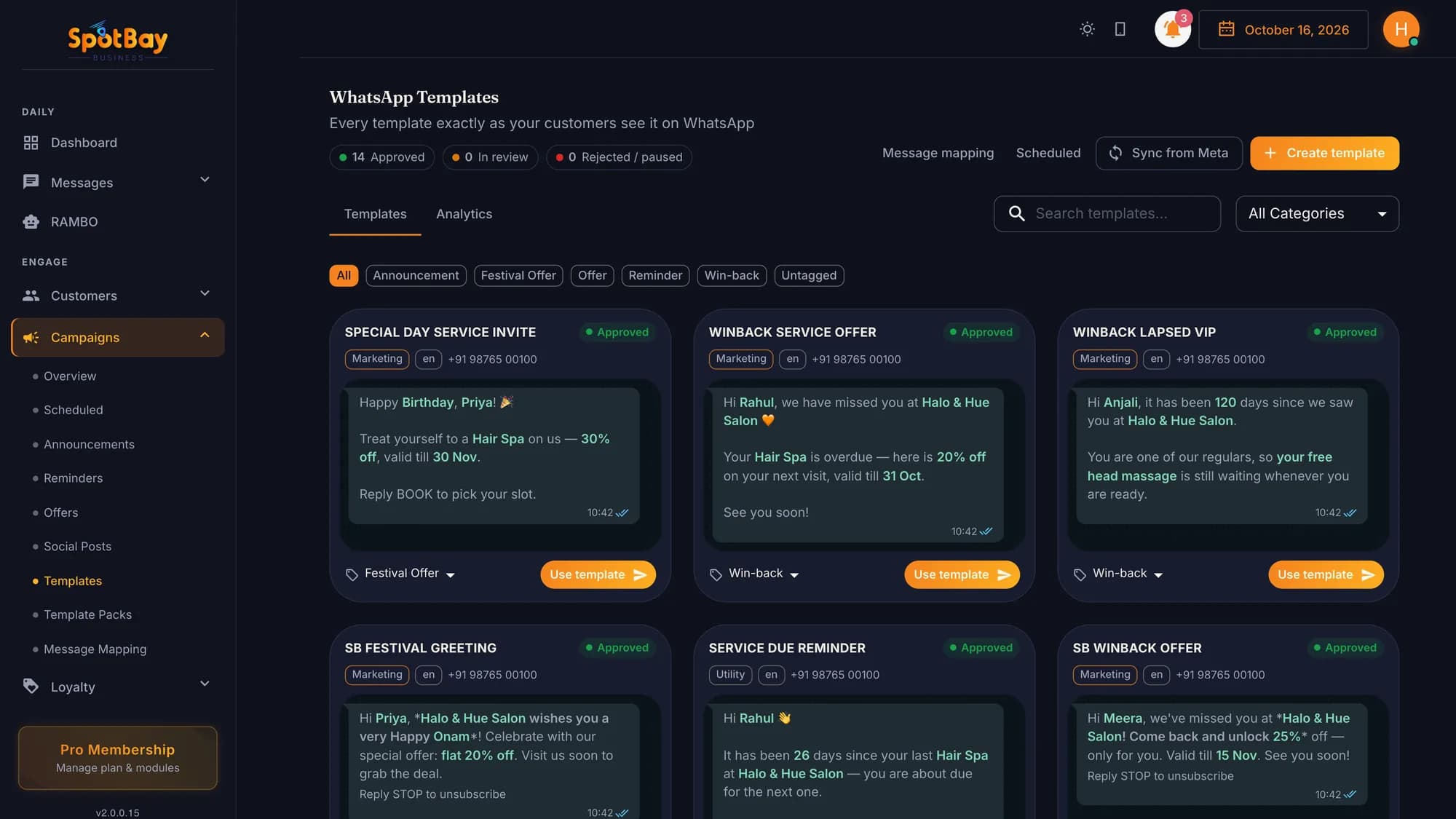
The real screens you'll use
Captured from SpotBay with a sample business.
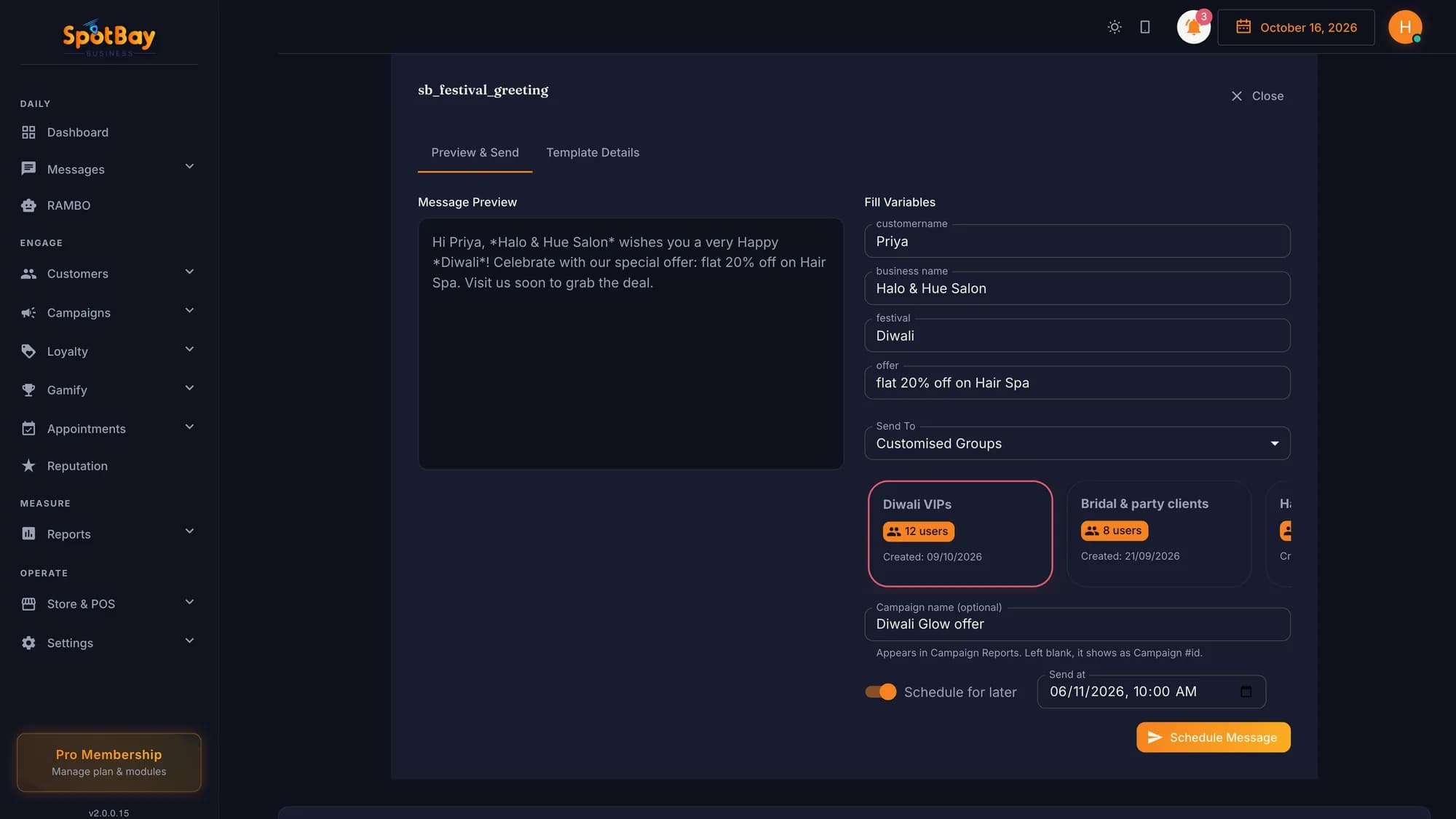
Compose
Fill in the template, pick the audience, schedule it
Preview the exact message, choose a Smart Group or a tag, and send now or at a time you pick.
- Live message preview
- Send to groups, tags or everyone
- Scheduled sends can be edited or cancelled
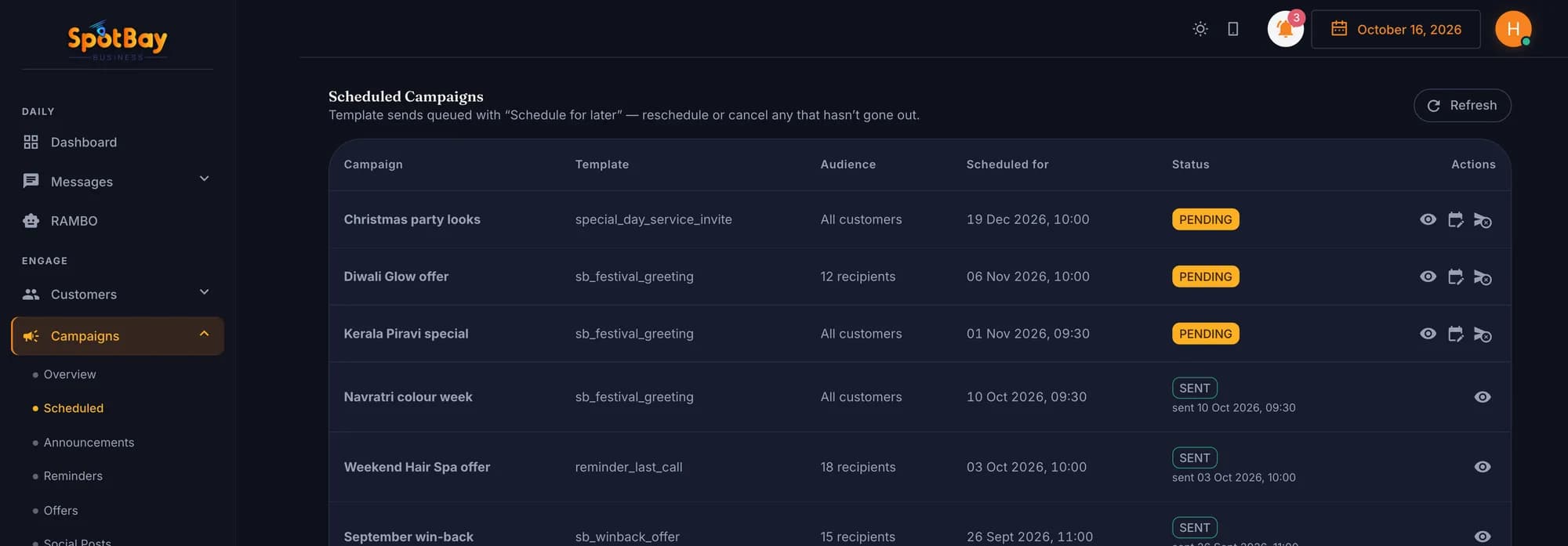
Scheduled
See what is going out, and when
Every scheduled campaign with its template, audience and send time — and the ones already sent.
- Pending and sent at a glance
- Reschedule or cancel before it goes
- Times in IST
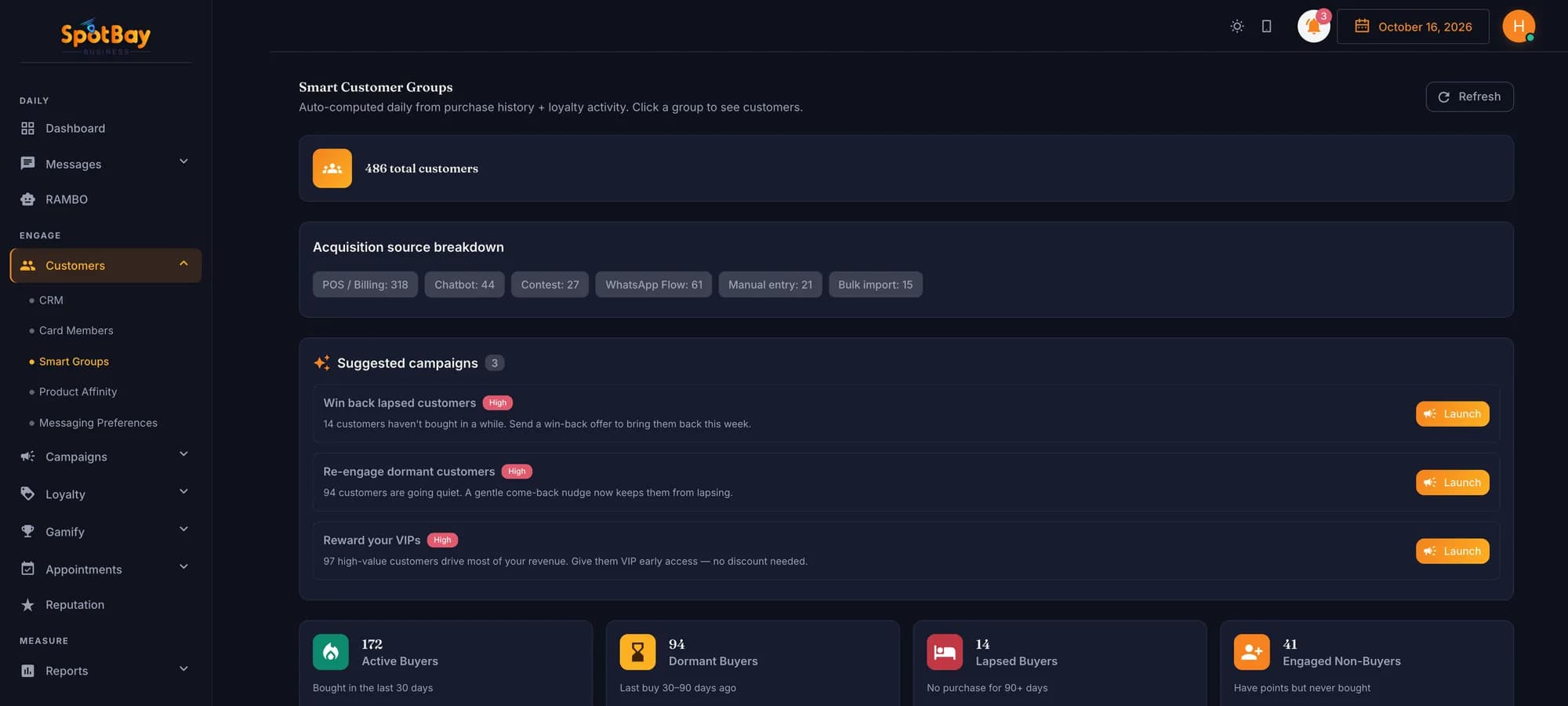
Smart Groups
Audiences that sort themselves
Active, dormant, lapsed, high value and more — refreshed every 3 hours and ready to message.
- Suggested campaigns for each group
- Send straight to a group
- See where customers came from
How businesses use it
Restaurants & cafés
Café Aroma sends a weekday lunch offer to its Dormant Smart Group at 11:30 am, with a Call button so guests can phone ahead.
Salons & spas
Glow Studio tags its bridal clients and sends them a festive package with a photo of the look and a Link button to its booking page.
Clinics
CarePlus Clinic writes its health camp notice in English and in Malayalam, and sends each version to its own Tag.
Fitness & wellness
Pulse Fitness lets the miss-you nudge reach members who have stopped coming, and sends the new batch timetable to everyone as a PDF.
Hotels
A hotel sends a weekend stay offer to past guests in its High Value Smart Group, with a Call button for the front desk.
Retail
Urban Threads sends a new-arrivals video to its One-Time Buyers, with a Link button that opens its online store.
What’s included
Your own WhatsApp number
Connect your WhatsApp Business number through Meta's embedded signup inside SpotBay. If you have more than one number, choose it under Send from.
Templates and one-click packs
Build Marketing, Utility and Authentication templates with a text, image or video header and up to 3 Link or Call buttons. Or install a curated pack such as Reminders.
Six template languages
Write templates in English, Hindi, Malayalam, Tamil, Arabic or Spanish, so customers read your offer in the language they use.
Smart Groups and Tags
Send to All Customers, Smart Groups such as Active Buyers, Dormant or High Value, Suggested Customers, or Tags you create yourself.
Automatic Campaigns
Birthday and anniversary wishes, miss-you nudges, points expiry reminders and upsell messages go out on their own once you switch them on.
One inbox for replies
Replies from all your numbers come into one inbox. Your bot can answer first, and you can Take Over any chat, then Return to Bot when you're done.
Opt-outs handled
Customers reply STOP or unsubscribe to opt out, and START to opt back in. See them on the Messaging Preferences page and in the Marketing Opt-outs report.
Campaign Reports
Sent, Delivered, Read, Failed, Opted-out and Retrying counts for each campaign, with Meta's reason for every failure and a CSV export.
Credits you can see
Separate balances for WhatsApp marketing, WhatsApp utility, SMS and email messages. Top up from the app when you need more.
Sending rules
- Send now, or schedule for later in IST
- Edit or cancel a scheduled send before it goes
- Attach an image (up to 5MB), a video (up to 16MB) or a PDF
- Announcements go as a free session message to customers active in the last 24 hours, and as a template to the rest
- At most 2 promotional announcements per customer a day, and none between 10pm and 8am
- Smart Retry resends failed messages with a gap between tries, and you can retry by hand
Numbers and credits
- Start on SpotBay's shared number with the free plan
- Campaigns, templates, the inbox and chatbots need your own number
- Own number setup is ₹5,000 per number on Growth Pro
- Growth Pro includes 500 free messages a month
- Buy message credits and top up from the app
Developer API
- Call Meta's Graph API through SpotBay at /wa-api
- Each sb_wa_ token is tied to one of your own numbers
- Send messages and media, update your business profile, and list, create or delete templates
- Up to 300 requests a minute per token
- Rotate or revoke tokens, and see the usage log
Works with the rest of SpotBay
Questions people ask
Do I need my own WhatsApp number?
You can start on the free plan with SpotBay's shared WhatsApp number. To run campaigns, create your own templates, or use the inbox and chatbots, you connect your own WhatsApp Business number through Meta's embedded signup inside SpotBay.
Does Meta have to approve my messages?
Yes. Every template goes to Meta for review before you can send it. SpotBay checks the approval status every 15 minutes and shows it next to each template. Replies to a customer inside an open 24-hour service window don't need a template.
What is the 24-hour service window?
When a customer messages you, WhatsApp opens a 24-hour window in which you can reply freely. Outside it, you need an approved template. For announcements, SpotBay sends a free session message to customers who were active in the last 24 hours and a template to everyone else.
How much does it cost?
Growth Free is ₹0 a month on the shared number. Growth Pro is ₹2,000 a month per branch and includes your own number (₹5,000 setup per number) and 500 free messages a month. WhatsApp Plus starts at ₹500 a month for campaigns, and WhatsApp Pro is ₹5,000 a month with the live chat inbox, chatbots and 5 WABA approvals. Plans are billed annually, plus 18% GST. WhatsApp message charges are separate and are paid from your credits.
What happens when a customer doesn't want messages?
They reply STOP or unsubscribe and SpotBay opts them out. If they reply START, they opt back in. You can see opt-outs on the Messaging Preferences page and in the Marketing Opt-outs report, and they show up in each Campaign Report.
Which languages can I use?
Templates can be written in English, Hindi, Malayalam, Tamil, Arabic or Spanish. The SpotBay app itself is in English.
Can I connect SpotBay to my own software?
Yes. The developer API at /wa-api passes your calls to Meta's Graph API with an sb_wa_ token tied to one of your own numbers. You can send messages and media, manage templates and update your business profile, at up to 300 requests a minute per token.
See WhatsApp Marketing working for your business
Create your account on the ₹0 plan and add what you need as you grow — or let us show you around on WhatsApp.