Ask every customer how their visit went, and act on low ratings fast
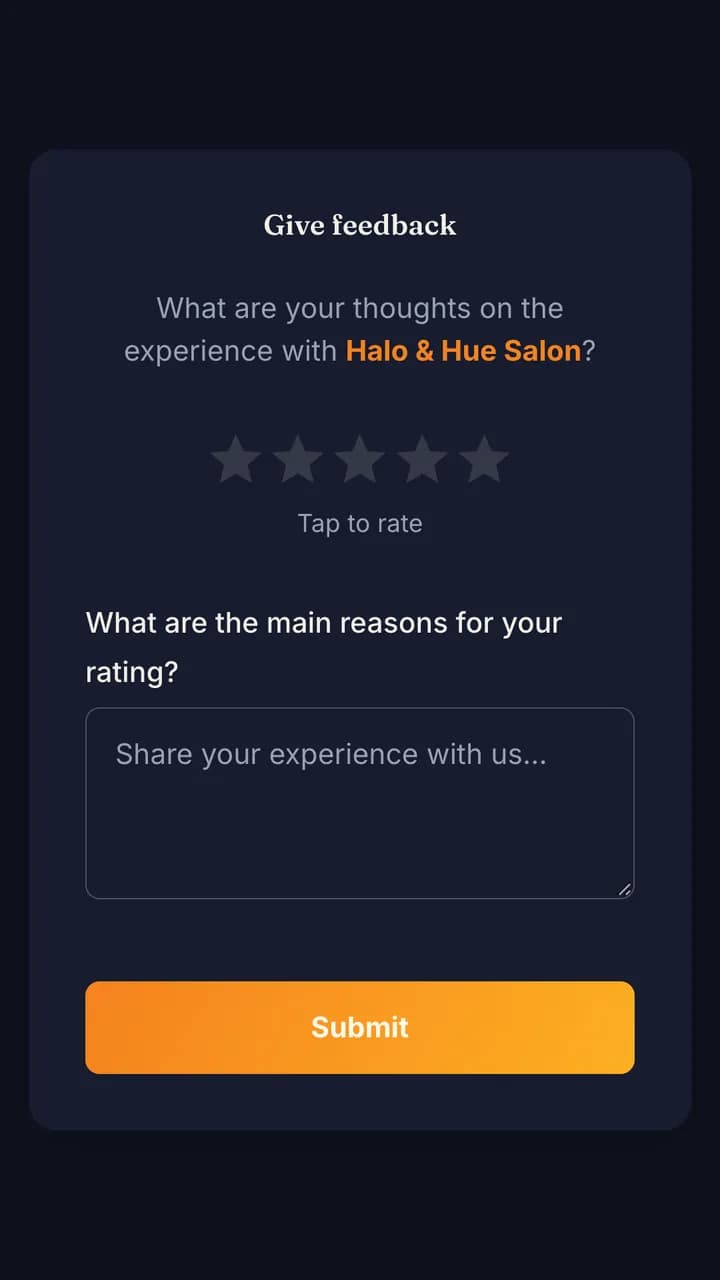
After a visit, SpotBay invites the customer on WhatsApp to rate their experience. Low ratings alert you instantly, and a Google review QR at your counter makes it easy for anyone to review you.
- Feedback invitation on WhatsApp after a visit
- Instant alert for ratings below your threshold
- Google review QR with tracked clicks
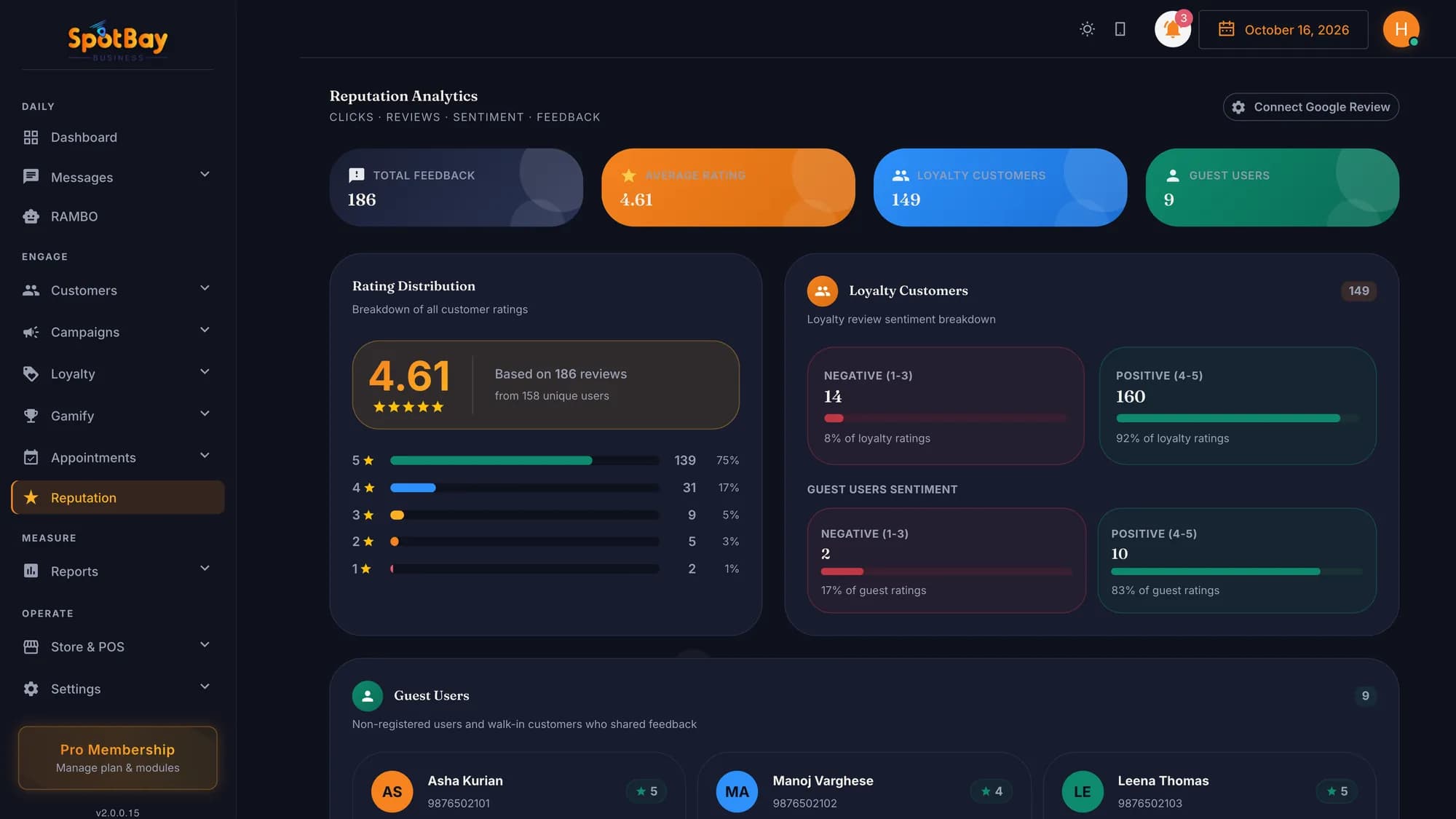
- Average rating with a star-by-star breakdown
- Runs in any browser
- Android POS app
- Official WhatsApp Business Platform
- GST invoices
See it in action
How feedback reaches you
A few simple steps after each visit, with nothing for your staff to remember.
Step 1 of 4
A closer look
The real screens you'll use
Captured from SpotBay with a sample business.
After the bill
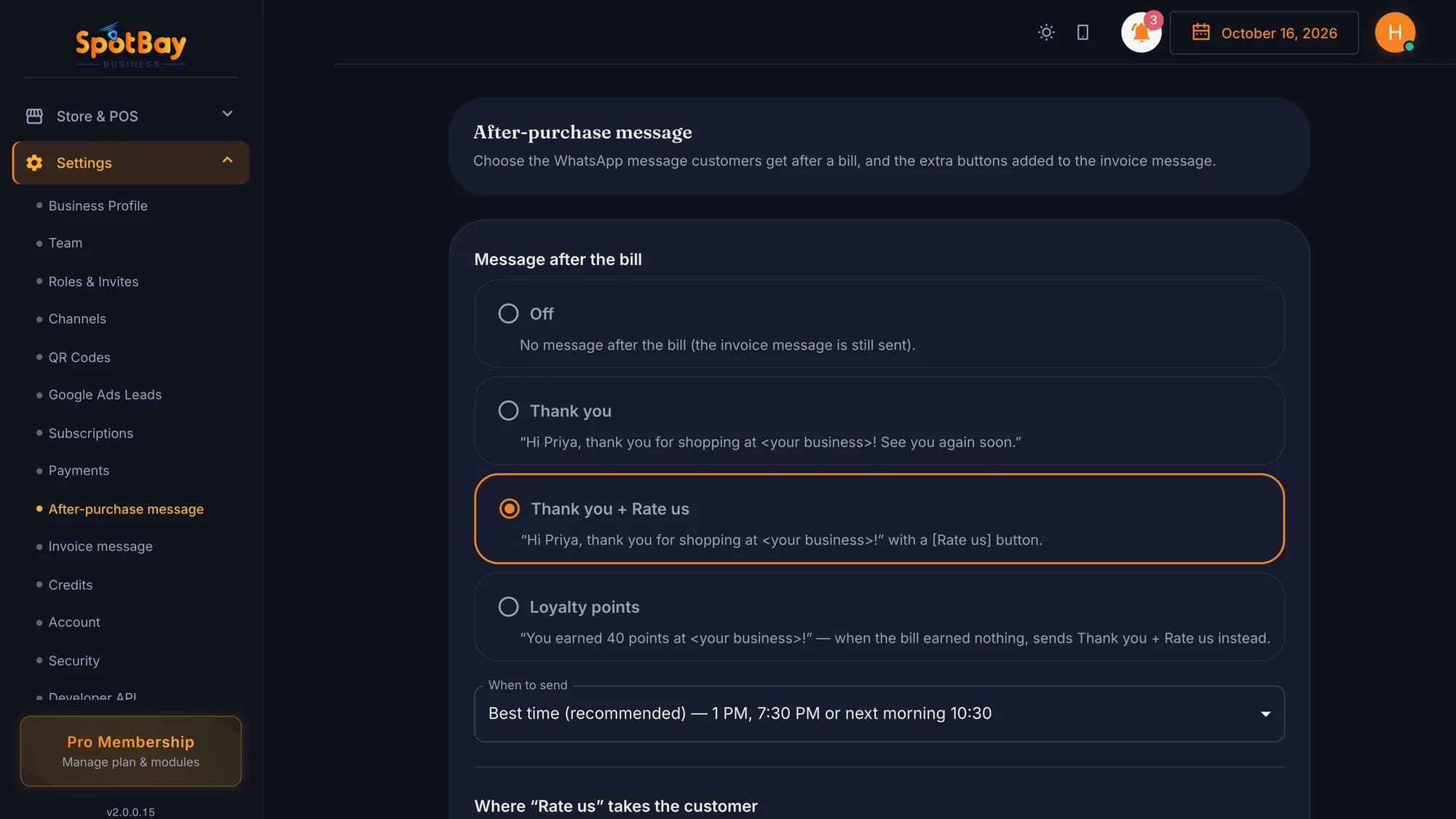
Choose the message customers get after paying
Thank you, thank you with a Rate us button, or their loyalty points — sent at the best time or after a delay you set.
- Thank you + Rate us
- Best-time sending
- Works with your invoice message
How businesses use it
Restaurants & cafés
Café Aroma gets an alert when a guest rates a visit 2 stars, and the manager follows up with them that evening.
Salons & spas
Glow Studio sends “Thank you + Rate us” after each bill, and offers cashback for leaving feedback.
Clinics
CarePlus Clinic keeps a Google review QR at the reception desk, so patients can review it on the way out.
Fitness & wellness
Pulse Fitness checks its average rating and the star breakdown each month to see how members feel about the new class timings.
Hotels
A hotel sets TripAdvisor as its preferred review platform, and the owner gets an alert for any rating below the threshold.
Retail
Urban Threads puts a Google review QR at the billing counter and sees how many clicks it gets each week.
What’s included
Feedback invitation
A WhatsApp message after a visit invites the customer to rate their experience.
“Rate us” after purchase
Choose Thank you + Rate us as your after-purchase message, sent at the “Best time” or after a delay you set.
Low-rating alerts
Set a threshold. Any rating below it sends an urgent alert to the owner.
Average rating
See your average rating and how ratings split across one to five stars.
Google review QR
A QR for your counter that takes customers to review you on Google, with clicks tracked.
Preferred review platform
Pick Google, Zomato or TripAdvisor as the place you would like reviews.
Cashback for feedback
Reward customers with cashback for leaving feedback, one time or on every purchase.
Feedback in your chatbot
Add a Feedback or Review option to your WhatsApp chatbot menu.
Collecting feedback
- Feedback invitation on WhatsApp after a visit
- After-purchase options: Thank you, Thank you + Rate us, or Loyalty points
- Feedback and Review options in your chatbot
- Cashback for feedback, one time or on every purchase
Ratings and alerts
- Average rating shown in Reputation
- Star-by-star breakdown of ratings
- A low-rating threshold that you set
- Urgent alert to the owner for ratings below it
Public reviews
- Google review QR with tracked clicks
- Preferred platform: Google, Zomato or TripAdvisor
- Reputation add-on at ₹200/mo, free with Growth Pro
- Branded WhatsApp QR with tracked scans
Works with the rest of SpotBay
Questions people ask
How does SpotBay collect feedback?
After a visit, the customer gets a WhatsApp message inviting them to rate their experience. You can also use the after-purchase “Thank you + Rate us” message, or add a Feedback option to your chatbot.
What happens when someone leaves a low rating?
If a rating is below the threshold you set, the owner gets an urgent alert, so you can reach out to the customer quickly.
Can I read or reply to my Google reviews in SpotBay?
No. SpotBay does not pull in or reply to Google reviews. Use your Google Business Profile for that. SpotBay shows the ratings customers give through its own feedback messages.
Which review sites can I use?
You can set Google, Zomato or TripAdvisor as your preferred review platform. The review QR is for Google.
Can I reward customers for feedback?
Yes. You can offer cashback for leaving feedback, either one time or on every purchase.
Does SpotBay analyse what customers write?
No. You see the average rating and how ratings split by stars. SpotBay does not use AI to read the text of feedback.
Which plan includes feedback and reviews?
It is part of the Reputation add-on, at ₹200/mo. Reputation is free with Growth Pro.
See Feedback & Reviews working for your business
Create your account on the ₹0 plan and add what you need as you grow — or let us show you around on WhatsApp.