Bring customers back with reminders that send themselves
Birthdays, anniversaries, a missed visit or points about to expire: SpotBay sends the WhatsApp message on its own. Set it up once, then see the revenue won when customers come back.
- Birthday, anniversary and miss-you messages
- Triggers from dates, products, visits or appointments
- Repeats weekly, monthly, quarterly or yearly
- Revenue won shown in the Performance tab
- Runs in any browser
- Android POS app
- Official WhatsApp Business Platform
- GST invoices
See it in action
Set it once, and the reminders keep going
Here is how a reminder goes from a date on file to a customer back at your counter.
Step 1 of 4
A closer look
The real screens you'll use
Captured from SpotBay with a sample business.
Your own reminders
Remind people when it is time to come back
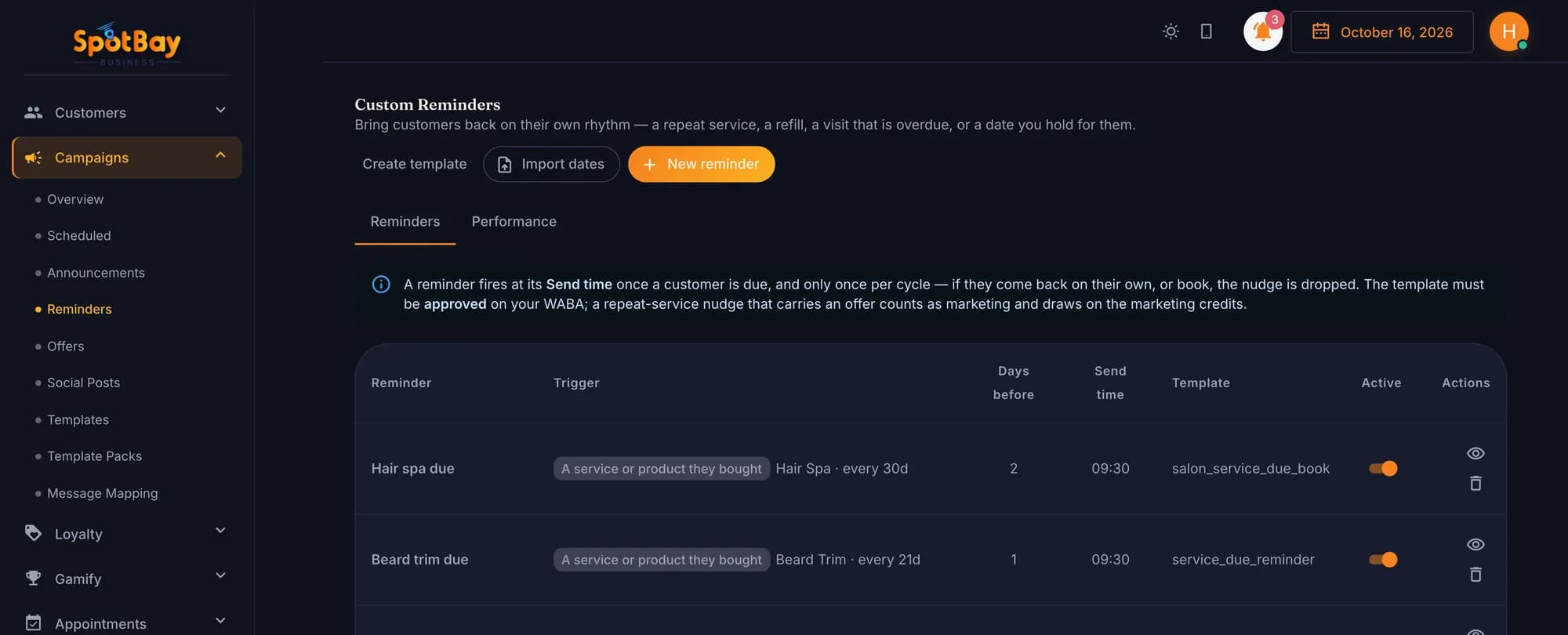
Set a reminder on a product, a visit or a date — like a colour touch-up every 30 days — and SpotBay sends it on time.
- Product, category, visit, appointment or date triggers
- Weekly to yearly repeats
- Quiet hours and cooldowns
Results
Count the customers who came back
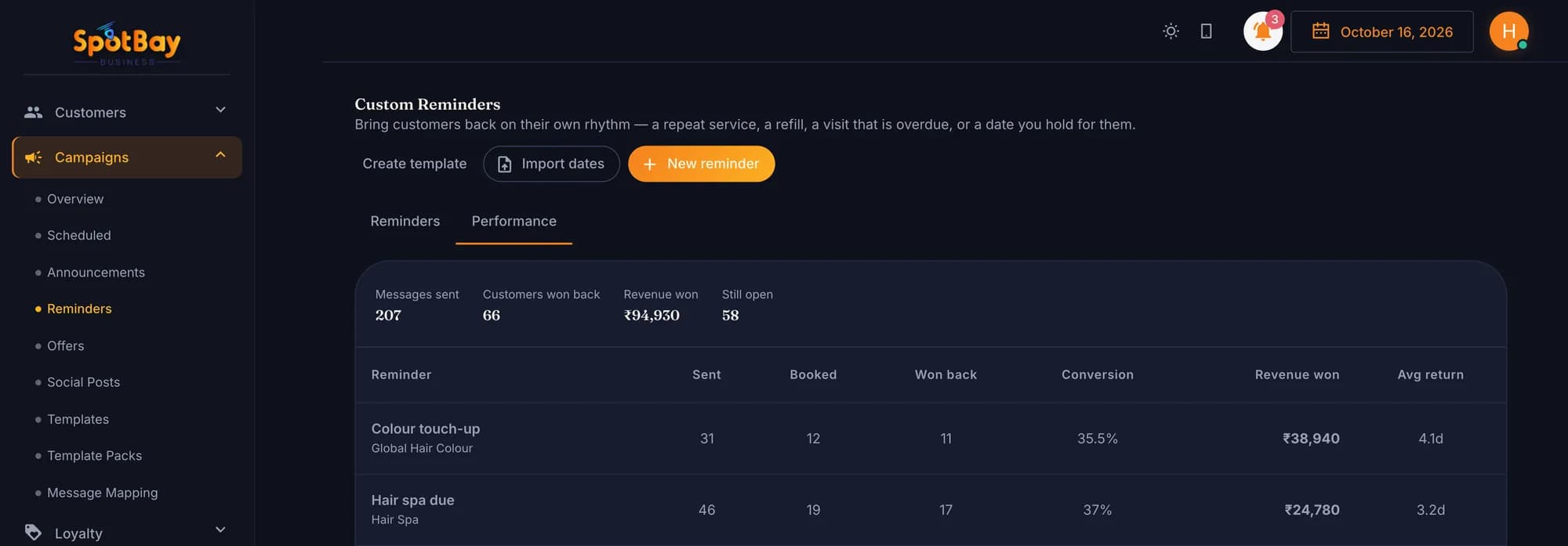
Each reminder shows how many were sent, how many returned and the revenue that followed.
- Won-back customers
- Revenue won
- Conversion rate
How businesses use it
Restaurants & cafés
Café Aroma sends a birthday wish on WhatsApp, and a miss-you nudge to regulars who have not visited in a while.
Salons & spas
Glow Studio sets a product trigger for hair colour, so those customers get a reminder to book their next colour.
Clinics
CarePlus Clinic sends appointment reminders a day and two hours before each visit, and a follow-up when a check-up is due.
Fitness & wellness
Pulse Fitness imports members’ joining dates from a CSV and sends a yearly message on each one. A visit trigger nudges members who have stopped coming in.
Hotels
A hotel sends anniversary wishes to past guests, and a thank-you with a “Rate us” option after each bill.
Retail
Urban Threads reminds shoppers before their points expire, and uses a category trigger to tell recent buyers about new arrivals.
What’s included
Automatic Campaigns
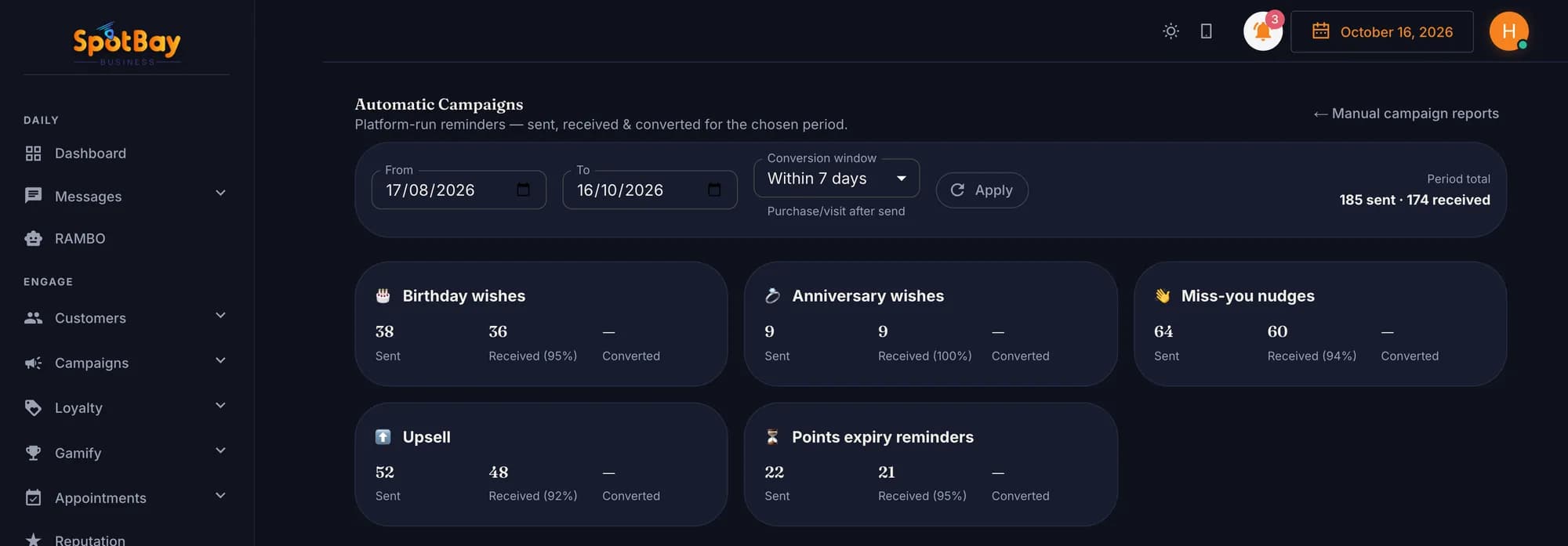
Birthday wishes, anniversary wishes, miss-you nudges, points expiry reminders and upsell, ready to switch on.
Triggers that fit your business
Start a message from a date field, a product, a category, a visit, an appointment or a segment.
Repeating reminders
Run a reminder weekly, monthly, quarterly or yearly, so it comes round again without you.
Quiet hours and cooldowns
Keep messages out of late hours, and stop the same customer getting reminders too often.
CSV import of dates
Bring in birthdays, joining dates or renewal dates from a CSV file.
After-purchase message
After a bill, send Thank you, Thank you + Rate us, or Loyalty points, at the “Best time” or after a delay you set.
Appointment reminders
WhatsApp confirmation, reminder and cancellation for bookings. Pick reminder times from 1 week to 30 minutes before.
Revenue won
The Performance tab shows the revenue won when a customer comes back after a reminder.
Reports
See Automatic Campaigns and the Message Log under Reports, next to your campaign reports.
Automatic Campaigns
- Birthday wishes
- Anniversary wishes
- Miss-you nudges
- Points expiry reminders
- Upsell
Automation settings
- Triggers: date field, product, category, visit, appointment or segment
- Repeats weekly, monthly, quarterly or yearly
- Quiet hours and cooldowns
- CSV import of dates
- Performance tab with revenue won
Visit and appointment messages
- After-purchase: Thank you, Thank you + Rate us, or Loyalty points
- Sent at the “Best time” or after a set delay
- Appointment confirmation, reminder and cancellation
- Reminder times: 1 week, 2 days, 1 day, 4h, 2h, 1h or 30 min before
- Template packs for Appointments, Reminders and Thank-you install in one click
Works with the rest of SpotBay
Questions people ask
Which reminders can I switch on?
Automatic Campaigns cover birthday wishes, anniversary wishes, miss-you nudges, points expiry reminders and upsell. You can also build your own automations from a date, product, category, visit, appointment or segment.
Where do birthdays and other dates come from?
Customers can share their birthday through the Birthday option in your WhatsApp chatbot. You can also import dates from a CSV file.
Can a reminder repeat?
Yes. An automation can repeat weekly, monthly, quarterly or yearly. Quiet hours and cooldowns stop messages going out too late or too often.
How do I know if reminders are working?
The Performance tab shows the revenue won from customers who came back after a reminder. You can also open Automatic Campaigns and the Message Log under Reports.
What goes out after a purchase?
You choose: Thank you, Thank you + Rate us, or Loyalty points. It is sent at the “Best time” or after a delay you set.
Can I remind customers about appointments?
Yes. Bookings get a WhatsApp confirmation, a reminder and a cancellation message. Pick reminder times from 1 week to 30 minutes before; the default is 1 day and 2 hours before.
Can customers stop these messages?
Customers can reply STOP or unsubscribe to opt out, and START to opt back in. You can see who has opted out in the Marketing Opt-outs report.
See Customer Reminders working for your business
Create your account on the ₹0 plan and add what you need as you grow — or let us show you around on WhatsApp.