Restaurant billing software that does more than print a bill
Bill at the counter with CGST and SGST, HSN codes and a bill number that resets each financial year. Take cash, card, UPI or wallet on one bill, add the guest's points, and send the bill on WhatsApp. At the end of the day, count your cash and stock, and the owner gets a WhatsApp alert.
- GST rate and HSN code for each item
- Bill series that resets each financial year
- Split payment across cash, card, UPI and wallet
- Keeps billing offline and syncs later
- Runs in any browser
- Android POS app
- Official WhatsApp Business Platform
- GST invoices
See it in action
From the first order to the closing cash
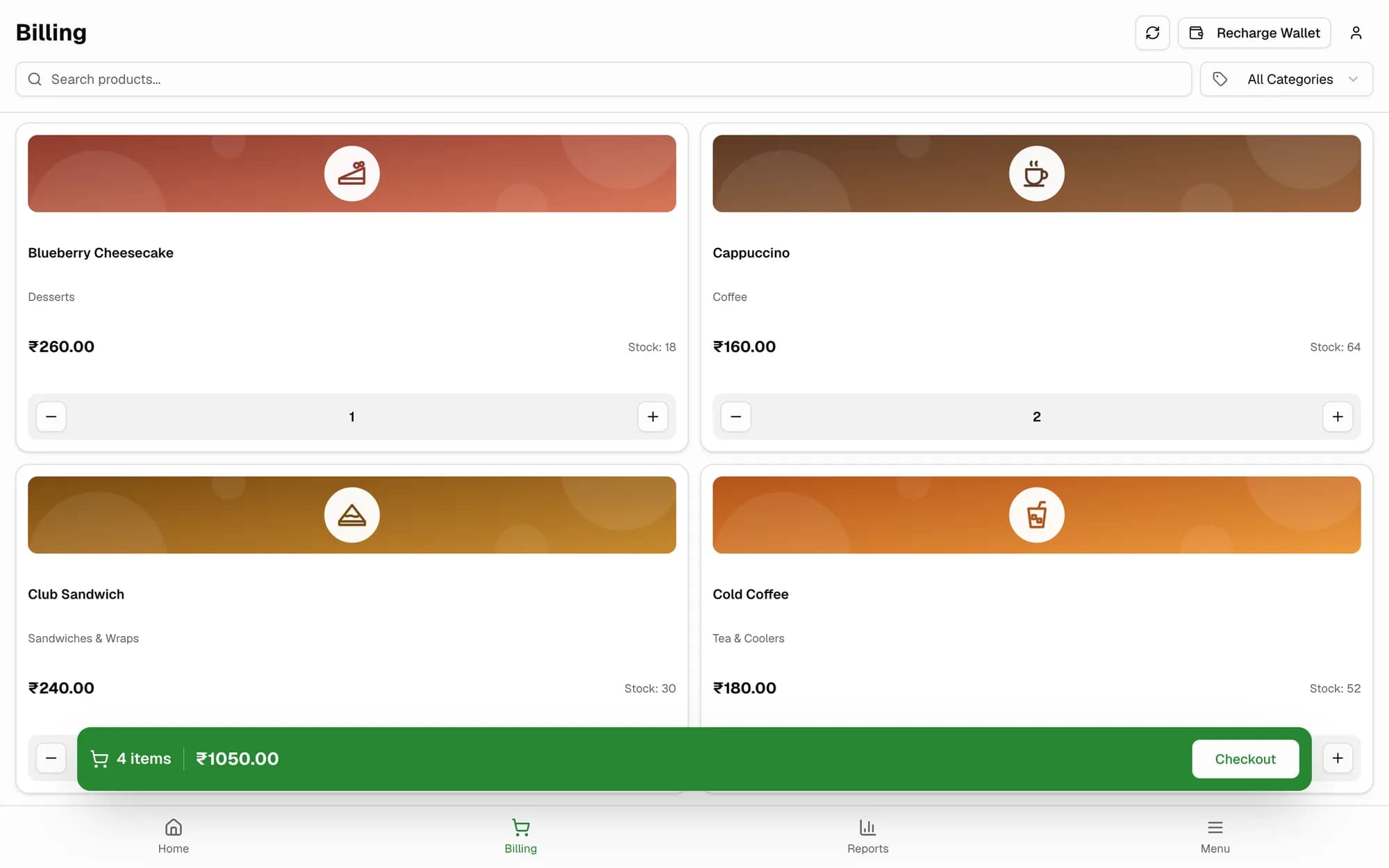
Set up tax and bill numbers once. After that, every bill follows the same four steps: Billing, Checkout, Rewards & Offers and Payment.
Step 1 of 4
A closer look
The real screens you'll use
Captured from SpotBay with a sample business.
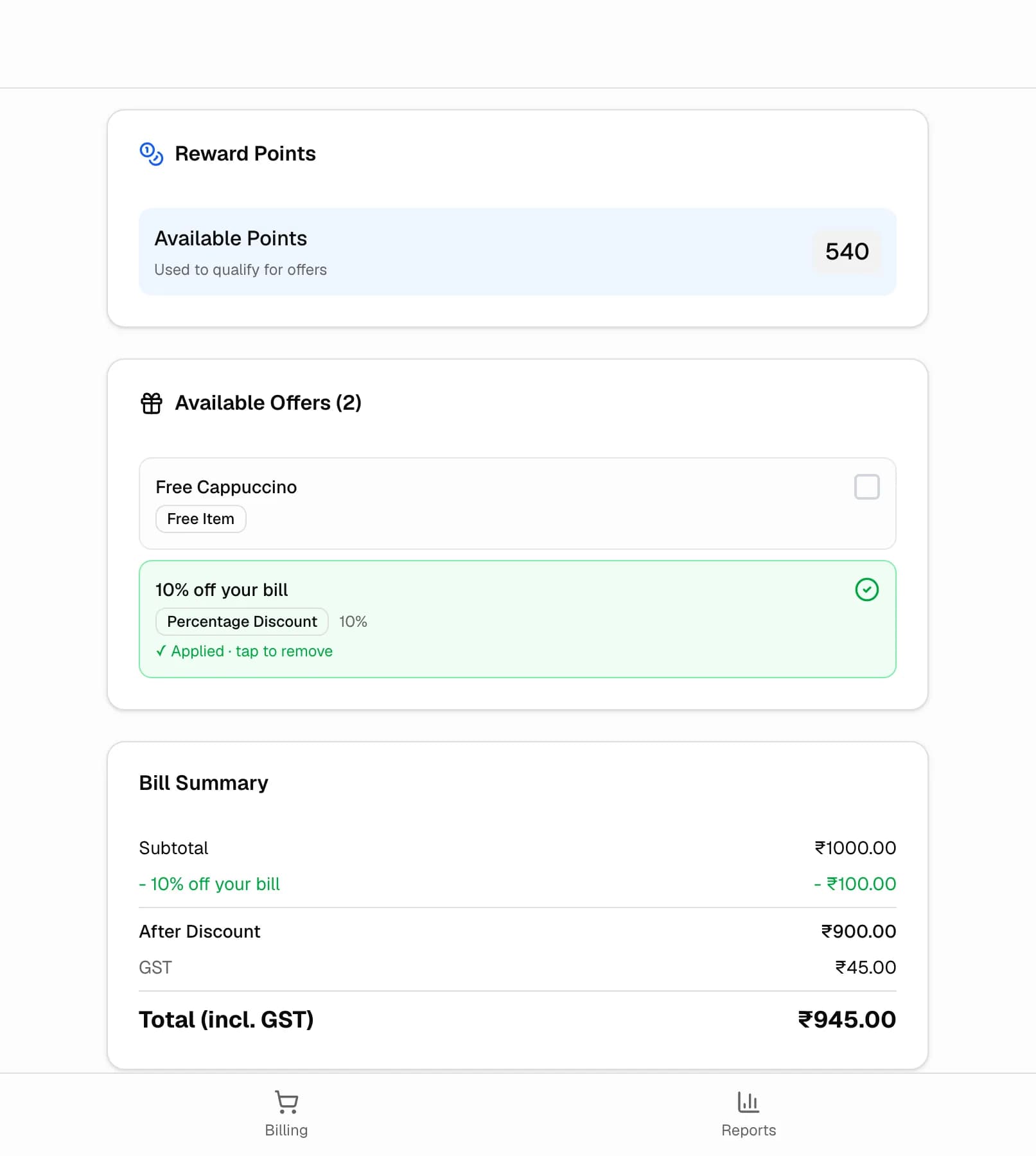
Checkout
Rewards and offers before the guest pays
Add the guest and their points and the offers they qualify for appear at checkout. Pick one and the bill summary updates, with GST worked out after the discount.
- Points balance on screen
- Free item, % off or flat offers
- GST after the discount
Payment
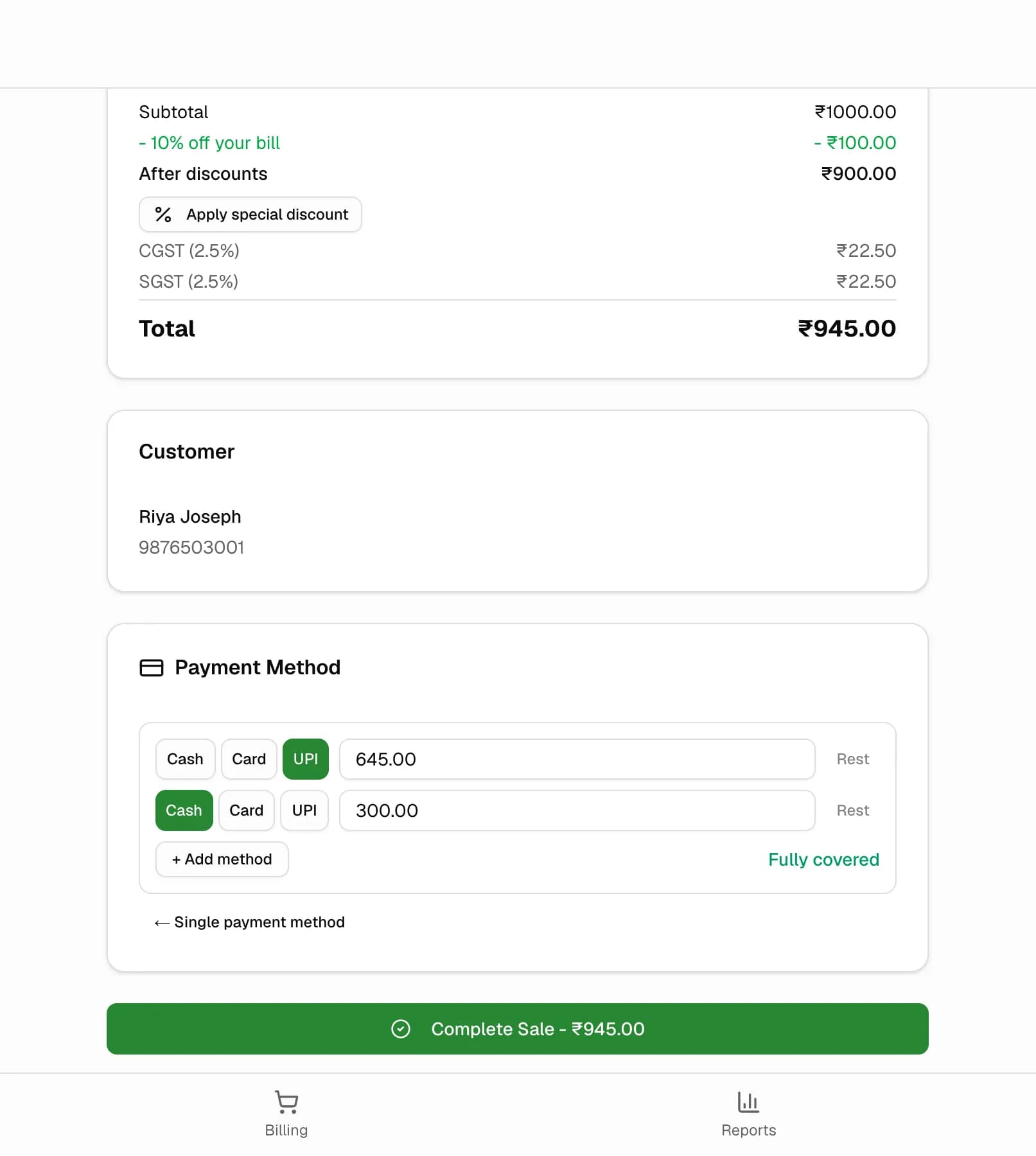
Split one bill between UPI and cash
Take cash, card, UPI or wallet, or add a second and third method. SpotBay shows when the bill is fully covered before you complete the sale.
- Up to three methods on one bill
- Special discount at payment
- Bill goes to the guest on WhatsApp
End of day
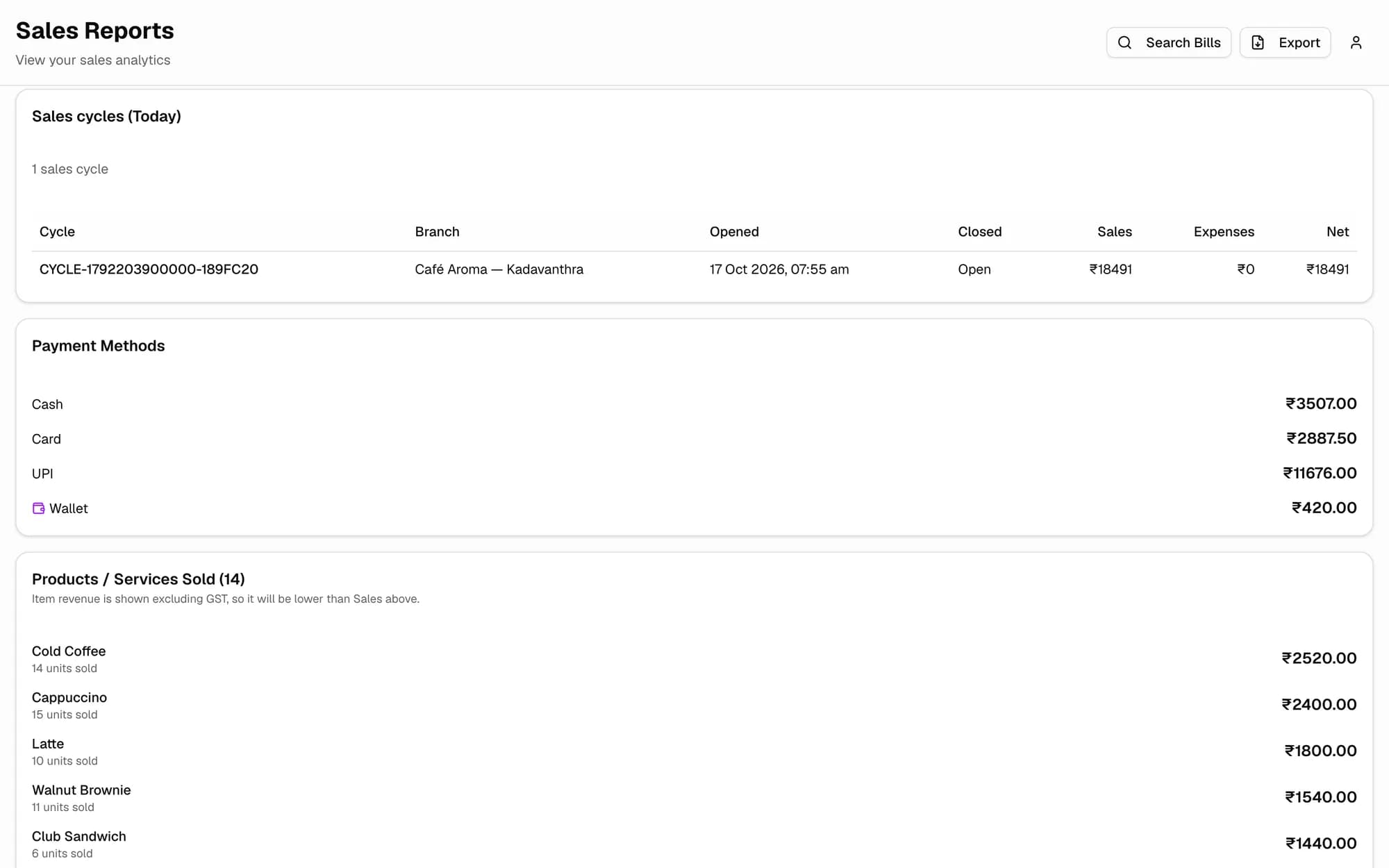
Know how today went
Today's sales cycle, what came in by cash, card, UPI and wallet, and which items sold the most.
- Totals by payment method
- Products sold, by revenue
- Sales cycles with expenses and net
How food businesses bill with SpotBay
Cafés
Café Aroma bills a cappuccino and a croissant and scans the regular's brand-page QR. The 80 mm receipt prints, the points are added, and the bill reaches the guest on WhatsApp.
Quick service
A burger counter saves a busy order as a draft bill while the guest decides, then brings it back. The guest pays part by UPI and the rest in cash on the same bill.
Fine dining
A fine-dining restaurant settles bills at the cashier's desk and prints them on A4 in the Elegant design, with its logo and GSTIN. Guests pay by card, UPI or both on one bill.
Bakeries
A bakery sells cakes by weight as variants and looks up packaged items by barcode. Sales reduce stock, and the low-stock list shows what to reorder before the weekend.
Cloud kitchens
A cloud kitchen takes orders on its own SpotBay online store. Each order lands in the Online Orders screen and moves from Confirmed to Out for delivery, with a WhatsApp update to the customer at each step.
Chains
A four-outlet chain creates its menu at the main branch and allocates items to each outlet. Every outlet has its own login and stock, and bill numbers run per outlet or across the group.
Everything at the billing counter
GST on every item
Set up tax components such as CGST and SGST, then give each item its GST rate and HSN code. Your GSTIN, logo and footer print on the bill.
Bill numbers by financial year
Build a bill pattern such as {ALIAS}{SEQ}/{FY}. It resets each financial year and runs per branch or shared, and “Set next serial” lets you carry on from your old numbers.
Split payment and discounts
Take Cash, Card, UPI or Wallet, or split one bill across them. A special discount can be a %, a fixed amount or a target amount to collect, and it needs a reason.
Thermal, A4 or Bluetooth
Print 58 mm or 80 mm receipts, or A4 invoices in Classic GST, Modern, Elegant or Compact. Bluetooth thermal printers work through the SpotBay POS Android app.
Loyalty at checkout
At the Rewards & Offers step, guests redeem points, cashback or an offer before they pay. Points for the bill are added on their own.
Bill on WhatsApp
After the sale, the invoice goes to the guest on WhatsApp with a link to the bill, plus an optional thank-you message.
Start Day and Close Day
Open with your cash and a stock check, and close with Closing Stock & Cash. The owner gets a WhatsApp alert at both ends of the day.
Works when the internet drops
The POS runs as an installable web app. Sales made offline are saved and synced once you are back online.
Reports for you and your accountant
- Daily, weekly, monthly and annual sales
- Top products and payment-method split
- Net profit after expenses
- WhatsApp bill delivery stats
- A monthly PDF, plus exports to CSV, Excel and PDF
Menu, stock and purchasing
- Items with images, variants and categories
- Barcode lookup and search at the counter
- Import items from CSV or XLSX with a New / Update / Skip preview
- Stock per branch with min and max levels and a low-stock list
- Purchases, Vendors and Expenses in the same app
Branches and staff
- Main branch creates items and allocates them to each outlet
- A separate login for each branch
- Owner, Manager, Executive or custom roles
- “Billed by” on each bill and staff on each line
- Staff Sales Report with a leaderboard
Works with the rest of SpotBay
Questions people ask
Does SpotBay make GST bills for restaurants?
Yes. You set up tax components such as CGST and SGST, and each item has its own GST rate and HSN code. Bills carry your logo, GSTIN and footer, and the bill number follows a pattern you choose that resets each financial year. Sales export to CSV, Excel or PDF for your accountant.
Can loyalty be applied while billing?
Yes. The Rewards & Offers step comes before payment, so the guest can redeem points, cashback or an offer on the same bill. New points are added automatically, and the bill reaches the guest on WhatsApp.
What about printers and hardware?
SpotBay POS runs in a browser on the computer or tablet you already have. Receipts print on 58 mm or 80 mm thermal paper and invoices on A4, and the SpotBay POS Android app prints to Bluetooth thermal printers. You can also look up items by barcode at the counter.
Does billing work across multiple branches?
Yes. The main branch creates items and allocates them to each outlet. Every branch has its own login and stock, and bill numbers can run per branch or across the group. Growth Pro is priced per branch.
Does it handle KOT, tables or table QR ordering?
Not in the SpotBay POS, which is built for counter billing. For KOT and kitchen display, floors and tables, reservations and table QR ordering, use BOOSTER, SpotBay's F&B operations suite (https://booster.spotbay.in).
Can it take Swiggy or Zomato orders, or process refunds?
Not today. SpotBay POS does not connect to Swiggy, Zomato or ONDC, and returns, refunds and credit notes are not in the POS yet. Orders from your own SpotBay online store come into the Online Orders screen.
How much does restaurant billing cost?
The POS is an add-on: ₹1,000 a month with Growth Pro, or ₹2,000 a month on any other plan. Prices are billed annually, plus 18% GST. You can start on the ₹0 Growth Free plan and add the POS when you are ready.
See Restaurant Billing working for your business
Create your account on the ₹0 plan and add what you need as you grow — or let us show you around on WhatsApp.